No products in the cart.

Learn how to reduce TTFB by up to 50% using CDN caching strategies. Includes real test results, cache optimization tips, and performance best practices.
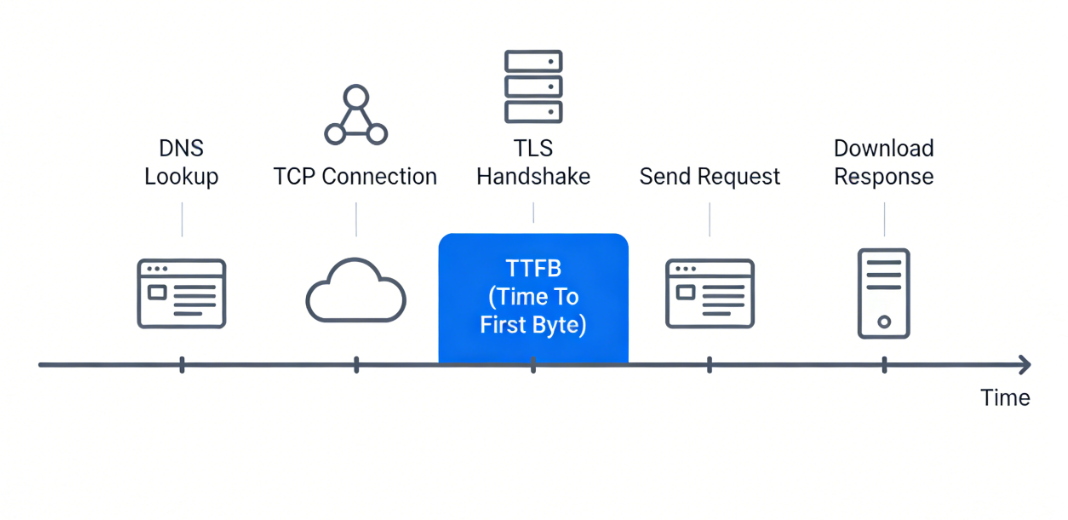
TTFB (Time To First Byte) at a glance, it's the moment between a user request sent from a browser and the first byte of data received back from the server. A lower TTFB is critical since it shapes the user's initial impression of response speed. Typically, it's a behind-the-scenes factor during a white-screen load when the user clicks a link and the browser appears to be 'spinning.'
But this 'white-screen time' the user experiences is really a combination of TTFB, downloading, and rendering. Even though TTFB is a huge chunk of white-screen time, it alone is not the whole story...
1.What causes a long delay before the first byte? Here are some of the usual suspects:
DNS lookup - If the recursive DNS resolver of the user is slow or your authoritative DNS server is slow, this operation can take tens, or even hundreds, of milliseconds. (Tools like WebPageTest show DNS separately.)
Handshakes - For an HTTPS request, the TCP three-way handshake and TLS negotiation have to be completed before transferring data. Reusing connections is significantly faster; however, for first visits or when connection pools are cold, this can add considerable time. A misconfigured TLS certificate chain might result in an extra round trip and 200ms added to the TTFB.
CDN node processing time - Once the request comes in, the CDN node checks the cache, prepares response headers, and might perform some edge computing. Generally, CDN nodes take 1-5ms, but if caching rules are complicated or the node is running at a high load it can be pushed to 10-20ms results.
Back-to-origin latency - Cache miss means the CDN node fetches from the origin. The origin can be on a different continent. Cross-continent Round-Trip-Time (RTT) of 150-300ms is quite normal. Add origin processing (PHP, DB queries), and it is easy to have 500ms+.
In a nutshell, a high TTFB translates to 'too many cache misses + too low hit rate.' When users come across high TTFB, their immediate thought is 'the origin is slow.' So they go on optimizing databases, adding Redis, upgrading PHP. These indeed help but they do not remove the root cause: if most of your requests still have to go back to the origin, even the fastest origin wouldn't be able to beat a CDN edge node returning directly. With a decent cache hit rate, TTFB almost becomes a sum of user-to-edge-node network RTT plus CDN processing time (generally between 50-150ms). The speed of the origin is hardly a concern anymore.
2. Test Environment
Here are the details for our test environment. We used a live CDN caching setup, with the YewSafe edge caching approach as a reference architecture, to mimic actual cache hit and back-to-origin scenarios.
3. A Reality Check: Comparing Three CDN Caching Approaches
3.1 No Caching (Baseline)
Configuration: The domain was set with caching fully turned off, or the origin returned Cache-Control: no-store, no-cache, private. I went with the second option here since it is closer to a real misconfiguration.
The results (Tokyo node to Singapore origin):
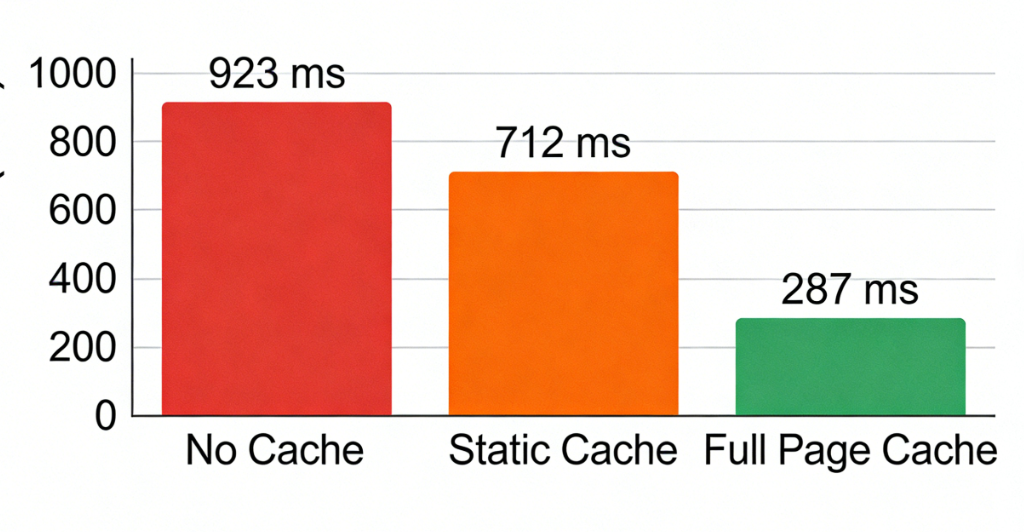
TTFB avg: 923ms
Minimum: 780ms (off-peak)
Maximum: 1,340ms (evening peak)
Ratio back-to-origin: 100%
Cache hit rate: 0%
Each request was directed from the Tokyo CDN node to Singapore origin. Network RTT is about 90-110ms, plus TLS handshake (an additional round trip for the first request). Origin PHP processing is 180ms + DB queries 50ms + transmission time. So 900+ms is actually normal here. In terms of user experience: clicking on a link results in a nearly a second spent on white screen.
3.2 Static Asset Caching
Configuration: This is what many CDNs will use by default – very long cache times (max-age=31536000) for static files under /static/, /media/, /js/, /css/, while HTML is kept with Cache-Control: no-cache. So each back-to-origin request for HTML is still needed for validation.
Results:
TTFB avg: 712ms
Min: 610ms
Max: 1,030ms
Back-to-origin ratio: ~65% (HTML always, static varies)
Static asset hit rate: ~88%
HTML hit rate: 0%
Caching static assets is definitely a step in the right direction yet the major limit of TTFB in this case will always be the HTML back-to-origin. Because TTFB for the first byte is solely determined by the HTML response header. So long as the HTML is fetched from origin, TTFB remains high.
3.3 Full-Page Caching
Configuration: HTML was cached too. WARNING: dynamic content must not be cached wrongly – otherwise users could see each other’s carts. A URL + partial Cookie was the cache key, and a reasonable TTL was set.
Settings:
Cache-Control: public, max-age=300, stale-while-revalidate=60
CDN edge TTL: 600 seconds
Cache key includes: full URL (including query parameters), currency cookie, store cookie. Ignore utm_* and PHPSESSID.
Results:
Average TTFB: 287ms
Min: 142ms (Tokyo node cache hit)
Max: 510ms (first request after cache expiry)
Back-to-origin ratio: ~18%
Cache hit rate: ~82%
Comparison table (last 10 requests average):
| Strategy | Avg TTFB | P95 TTFB | Back-to-origin ratio | Hit rate |
|---|---|---|---|---|
| No caching | 923ms | 1,250ms | 100% | 0% |
| Static asset caching | 712ms | 980ms | 65% | 0% (HTML) |
| Full-page caching | 287ms | 410ms | 18% | 82% |
Full-page caching reduced TTFB by almost 70%. Also, we see the P95 dropping from 1,250ms to 410ms – tail latency was improved even more. When cache is available, the CDN edge node is able to return response almost immediately and network fluctuations coming from cross-continent are eliminated.
What’s more, the quality level also varies greatly among CDNs in terms of caching flexibility during live tests. Some of them only allow global TTL, no path-based rules, and no custom cache keys. Solutions like YewSafe that support path-level rules and custom cache keys are providing a big advantage in decreasing back-to-origin traffic and stabilizing TTFB.
4. How CDN Caching Can Cut TTFB Radically
When confronted with high TTFB, the natural tendency is to 'point fingers' at the backend. But consider this: your origin server is located in Silicon Valley and your user is in Tokyo. No matter what else is going on, the speed of light alone requires 150-200ms round trip. Add the TCP three-way handshake and TLS key exchange – each round trip on a latency-heavy link is a costly operation. It is not unusual in such circumstances that the origin CPU might be at 5% while the user has already waited for half a second.
So what does CDN caching do? It essentially turns the storage capacity of edge nodes into user time. Explicitly put:
Lower the physical distance between them - Transfer content to the edges nodes located in the user’s city. The user will no longer have to send requests across the oceans but instead will be served by a node near them. I have observed a game download client making TTFB cut by over 100ms just this way – you can’t beat physics, but you can route around distance.
Remove handshake round trips - An HTTPS handshake on a high-latency link demands multiple round trips. A nearby CDN node completes the handshake almost instantaneously. In addition to that, the CDN always maintains a persistent connection to the origin - much like a pre-laid pipe. Hence, the cache miss that requires back-to-origin fetch is served through the ready pipe instead of building a new one.
Turn off backend logic - Many API endpoints (such as retrieve product configurations, announcement lists) do not necessarily need live computation. Cache them at the edge – even if only for a few seconds – and what would have been database- and code-dependent requests are processed straight from the edge memory. TTFB is down to just several tens of milliseconds.
It's similar to how you have a convenience store downstairs. You don't go all the way to the factory every time you want a bottle of water. Shrink the path from kilometers to meters, and cutting TTFB by over 50% is completely doable.
5. Optimization Strategies That Work
Backed by many projects, here are some lifeboats in the waters of performance optimization.
5.1 Cache-Control made simple
Cache-Control sets the execution vector for CDNs. The origin always sends it, and the CDN usually complies (unless you make an override, which is not recommended).
Static assets (JS/CSS/fonts): Cache-Control: public, max-age=31536000, immutable. Most use one year. The 'immutable' banishes all browser and CDN validations saying, “This resource just will not change.” You make an update by simply changing the filename hash.
HTML (non-personalized user experience): Cache-Control: public, max-age=300, stale-while-revalidate=60. 5 minutes fresh, then 60 seconds where stale content can still be served while the CDN asynchronously revalidates. This prevents a stampede when cache expires.
API calls (cacheable read-only endpoints): Cache-Control: public, s-maxage=60, max-age=0. s-maxage only applies to shared caches like CDNs; max-age=0 tells browsers not to cache. The CDN caches for 60 seconds, but the browser always checks with the CDN (if the CDN has it, it returns; if not, it goes to origin).
Personalized content (logged-in homepage, cart API): Cache-Control: private, no-store. No caching at all. The CDN must pass through to the origin. If you absolutely must cache, use a cache key that includes the user ID.
5.2 Path-based caching
Different URLs (paths) on the same domain may need to be handled differently as they differ in update frequency and user single content personalization. For such situations, it is CDNs' consoles where you will most likely be able to set these caching rules easily:
| Path pattern | Edge TTL | Cache-Control | Notes |
|---|---|---|---|
| /static/* | 1 year | public, max-age=31536000, immutable | build artifacts |
| /media/catalog/product/* | 7 days | public, max-age=604800 | product images, rarely change |
| /product/* | 1 hour | public, s-maxage=3600, max-age=0 | product details, medium change frequency |
| /category/* | 5 min | public, max-age=300, stale-while-revalidate=60 | category lists, change faster |
| /customer/* | none | private, no-store | user center, must be real-time |
| /api/v1/prices | 10 sec | public, s-maxage=10 | price endpoint, needs high freshness |
Striking a balance between performance and caching mistakes can come from fine-grained control of this sort.
5.3 Cache key optimization
What the CDN does when it wants to determine if two requests are the same is it uses the cache key (a string of characters that uniquely identify the content) and by default, a combination of the whole URL (with query parameters) along with some headers will be the key. However, it is commonly observed that URLs contain a bunch of unnecessary parameters that, when included in the cache key, cause multiple independent copies of the same content to be cached, and this can tank your hit rate dramatically.
Case in point, a site spent months not realizing the homepage URL was being tagged with tracking parameters (e.g., ?utm_source=facebook&utm_campaign=summer). Each campaign was new and different, so the homepage ended up getting cached in thousands of separate instances - hit rate under 10% and TTFB often back-to-origin at 800ms.
The fix: set up the CDN to ignore parameters that aren’t significant for the response.
Ignore:
utm_source, utm_medium, utm_campaign, utm_term, utm_content
fbclid, gclid, msclkid
ref, referrer
_ga, _gl
Various A/B test parameters (unless the test version genuinely changes content)
Keep:
id, sku, product_id
page, offset, limit (pagination)
sort, order (if they change ordering)
currency, store (multi‑currency / multi‑store scenarios)
In addition to query parameters, cookies also have the potential to cause pollution of the cache key. Some CDNs include the entire Cookie header by default. That means each user with a different PHPSESSID creates a separate cached copy. The right approach is to include only cookies that affect the response, like currency, store_code, while ignoring PHPSESSID, _ga, etc.
Such direct involvement of the cache key design into the hit rate is one of the key features of YewSafe which supports advanced cache control - flexible cache key rules, ignoring specific query parameters, customizing which headers to include, selectively including cookie fields - all to prevent dynamic parameters from invalidating caches.
5.4 Setting Edge Cache TTL
What is TTL (Time To Live)? How long a cache is valid. Too short → lots of back-to-origin; too long → stale content.
My rule of thumb (adjust to your business):
| Resource type | Recommended TTL | Why |
|---|---|---|
| Hashed static assets (JS/CSS/fonts) | 1 year | Content never changes; update via filename |
| User avatars, generic images | 1 month | Infrequent changes; small impact if stale |
| Product images, brand banners | 7 days | Moderate update frequency |
| Blog post content | 1 day | If not updated daily |
| Product detail page | 1 hour | Price/inventory change moderately |
| Homepage, category pages | 5 minutes | Aggregated content changes faster |
| Real-time data APIs (inventory, price) | ≤1 minute | Needs high freshness |
Also use stale-while-revalidate. For example, max-age=300, stale-while-revalidate=60 means after the cache expires, for the next 60 seconds you can still serve stale content while asynchronously fetching fresh content. Users never wait for back-to-origin, and TTFB stays stable.
5.5 Cache Pre-warming
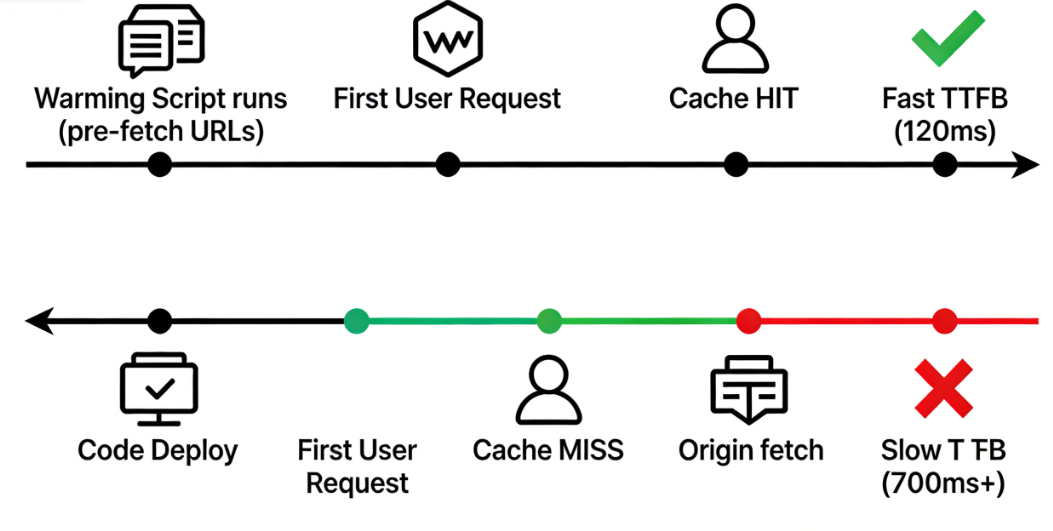
The first user has to wait a high TTFB cache miss when a live page is launched or a cache is manually purged. Pre-warming remedies this problem by sending the requests for these URLs beforehand without user intervention, thus filling the cache so that users will get edge responses right away.
Three ways this works here:
Pre-warm on deployment – Your CI script can automatically call the CDN API after the deployment of code or content update for pre-warming critical URLs (homepage, core product pages). After deployment, users won’t see a cold-start.
Scheduled pre-warming – Traffic has peaks (e.g., daytime high and nighttime low), so it is better to pre-warm the popular pages shortly before the peak.
Intelligent pre-warming – Predict which URLs will become hot (e.g., a campaign page, a trending product) by accessing logs, and pre-storing them to major edge nodes. Data-driven, not manual.
6. Advanced Optimizations
Getting deep into it, once you've mastered the basics of caching, your TTFB must be down to 200-300ms. This means it will be easier to pull it under 100ms by resorting to advanced tricks.
6.1 Regional Differentiated Caching
Content freshness may not be a top priority for all the regions where your users are. For example, the shorter TTL may be a good choice for your main markets (NA, Europe) where the freshness of the content being paramount, and the longer TTL for the emerging markets (South America, Africa) where the already high network latency will be reduced by lesser back-to-origin. CDNs allowing such conditional rules recognizing region or country are few but do exist.
6.2 Multi-CDN Orchestration
Not one CDN unbeatable everywhere. For instance, one might perform very well in North America, but packet loss could be an issue in Southeast Asia while another being very strong in Europe but covering South America sparsely.
Multi-CDN comprises two or more CDNs such that the users through intelligent DNS-based resolution or speed testing on the client side are routed to the currently best performing one. This can drastically reduce P95 TTFB and often improve overall availability. However, it also means a hike in operational complexity (config sync, log aggregation, cost allocation).
6.3 Edge Functions
If you can do a lighter version of origin logic at the CDN edge node, then you will reduce back-to-origin unduly.
Some examples:
Edge redirects – From User-Agent, determine which type of device the user has and send back from the edge a 302 to the mobile version directly.
Edge authentication – Validation of JWT tokens at the edge; origin is not touched in case of invalid requests.
Edge aggregation – Results form two backend APIs are combined thereby reducing client round trips.
An edge computing helps lower TTFB for requests which will otherwise have to go back to origin, because here, the edge node is not only geographically closer to the user but also powerful and fast enough.
7. Pitfalls to Avoid
These are mistakes I have made - it's my sincere wish that you avoid them!
Caching dynamic pages incorrectly
One of my early mistakes was thinking “full-page caching is awesome, let’s cache all.” The problem was that one page contained user nickname and shopping cart. Support came half an hour later: “many users are seeing other people’s accounts.” I panicked and did a rollback. Now any URL that involves user identity is either Cache-Control: private, no-store, or, if it must be cached at all, the cache key includes the user ID.
Overly long or short TTL
I have seen homepages with a TTL of 30 seconds. This will generate nearly 3,000 back-to-origin requests per day with a hit rate below 20% - TTFB stays high. On the flip side, a price endpoint with a 1-hour TTL caused “out of stock” items to still show as available. Operations was furious. Rule: TTL should be set to maximum staleness that business can afford. If you are not sure, start with a small one, monitor hit rate and increase gradually.
Thundering Herd or Cache Stampede
If all product pages have a 1-hour TTL and expire at the same time, the next wave of requests finds no cache and all go back to origin simultaneously. The origin gets slammed – slow responses or even 502s. Solutions: add random offset to TTL (e.g., 3600-3900 seconds); or use request collapsing (only the first request goes back to origin; others wait).
CDN feature limitations
Some cheaper CDNs look good until you try to configure path-based TTL, custom cache keys or stale-while-revalidate. Your fine-grained plans hit a wall. When choosing a CDN test: can it ignore query parameters? Can you set rules per path? Does it support request collapsing? These capabilities set the ceiling for your TTFB optimization.
More often than not, TTFB optimisation means not just faster origin but fewer origin requests. So a robust CDN caching strategy (think: full page caching, cache key tuning) can easily slash TTFB by anywhere from 30 to 50% in real environments.
FAQ
Q: Is TTFB network time or server time?
Both. When cached, it’s mostly network RTT + CDN processing. When uncached, it includes back‑to‑origin network and origin processing.
Q: Can dynamic pages be cached?
Yes. Use cache keys to differentiate states (currency, store), and set reasonable TTL. Fully personalized content (e.g., shopping cart) should not be cached.
Q: What’s the difference between s-maxage and max-age in Cache-Control?
s-maxage only applies to shared caches like CDNs; max-age applies to both browsers and CDNs. A common pattern: set s-maxage for the CDN and max-age=0 for browsers.
Q: Why is TTFB still high even with a CDN?
Check your hit rate. If it’s low, HTML is likely not cached, or your cache key design is causing fragmentation.
Q: How can I test if CDN caching is working?
Use curl -I https://example.com and look for headers like X-Cache: HIT or CF-Cache-Status: HIT (depends on the CDN). Also compare TTFB with and without caching.
Appendix: Ready-to-Use CDN Caching Configuration
To help you get started quickly, here is a template for origin Nginx configuration plus CDN rule settings. Adjust to your business.
Origin Nginx config (/etc/nginx/sites-available/example.com):
server {
    listen 443 ssl http2;
    server_name example.com;

    # Hashed static assets
    location ~* \.(js|css|woff2?|ttf|eot|ico) {
        expires 1 y;
        add_header Cache-Control "public, immutable";
    }

    # Images
    location ~* \.(jpg|jpeg|png|gif|webp|svg) {
        expires 30 d;
        add_header Cache-Control "public";
    }

    # HTML pages – dynamic but allow CDN caching
    location / {
        add_header Cache-Control "public, max-age=300, stale-while-revalidate=60";
        try_files $uri $uri/ /index.php?$args;
    }

    # API endpoints – short cache
    location /api/ {
        add_header Cache-Control "public, s-maxage=60, max-age=0";
        try_files $uri $uri/ /index.php?$args;
    }

    # User center – no cache
    location /customer/ {
        add_header Cache-Control "private, no-store";
        try_files $uri $uri/ /index.php?$args;
    }

    # PHP handling
    location ~ \.php {
        include fastcgi_params;
        fastcgi_pass unix:/var/run/php/php8.2-fpm.sock;
        fastcgi_param SCRIPT_FILENAME $document_root$fastcgi_script_name;
    }
}
CDN caching rule recommendations
| Path | Edge TTL | Cache key rules |
|---|---|---|
| /static/* | 31,536,000 sec (1 year) | Ignore query parameters |
| /images/* | 604,800 sec (7 days) | Ignore tracking parameters |
| /products/* | 3,600 sec (1 hour) | Keep ID, ignore sort/pagination |
| /api/* | 60 sec | Keep essential parameters |
| / | 300 sec | Ignore all query parameters |
Cache key optimization rules:
Ignore query parameters: utm_source, utm_medium, utm_campaign, utm_term, utm_content, fbclid, gclid, ref, _ga, etc.
Keep query parameters: id, slug, page, category – anything that meaningfully changes content.
Exclude from cache key: User-Agent (unless content is device-specific).

 Enrique Fay
Aug 06, 2024
 Enrique Fay
May 22, 2025
 Enrique Fay
Aug 11, 2024
 Enrique Fay
Mar 17, 2025
 Enrique Fay
Aug 11, 2024